I Built a Fully Local AI Book Club Host
Have you ever had to host a book club, but didn’t want to read the week’s assigned chapter? Here I’ll walk you through how you can create your own AI book club host in only twice the time it would have taken you to read the whole book.
What is it?
Several months ago, Qwen3 open-sourced their TTS model, and I thought “Wouldn’t book club be so much cooler with a celebrity host?” Here began the idea for a fully local, AI-powered, celebrity TTS model. After doing some testing on their demo at hugging face, I was absolutely blown away with the zero-shot voice cloning. Even with just a short sample audio, it actually felt like I could have been talking to the real Luka. So what does an AI book club host look like behind the curtain?
The Stack
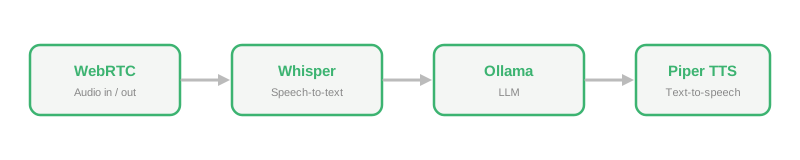
1. WebRTC
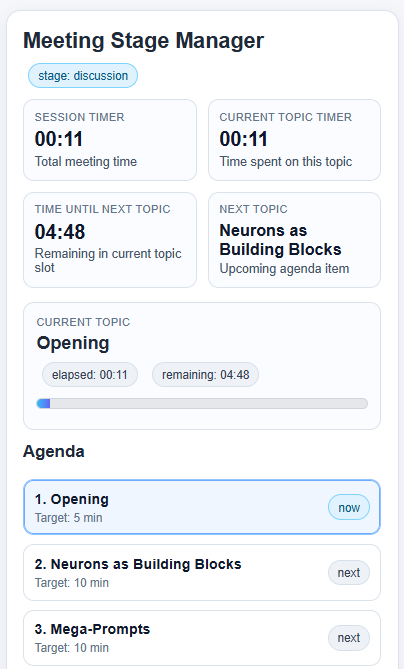
This component had to solve several problems. It had to receive audio, determine when us humans finished speaking, fetch the audio transcriptions, and then pass that on to the LLM. On top of all that, it also needed to orchestrate the book club. LLMs can’t inherently do things like state management and managing timers. In order to have this feel like a real book club and not just a conversation with a budget ChatGPT, it would need to be able to guide the meeting from topic to topic. Lastly, it needed to be interruptible, because having definitely-not-Luka go on an unstoppable tirade would really ruin the session.
2. Speech-to-text (Whisper)
This stage was pretty simple. Because I was trying to get a realtime conversation feeling from the experience, I chose to run this on the GPU to be as fast as possible, but honestly, even the CPU version ran pretty quickly.
3. LLM (Ollama)
I knew I wanted this to be fully local, so that ruled out any flagship models like Sonnet 4.6. After benchmarking way too many different Ollama-supported models to find a balance between speed and performance, I found the sweet spot. With my GPU, I was locked in to models that were 4B parameters or less, otherwise there was too much of a delay. There were some models that outperformed Ollama in terms of feeling more human-like, but Ollama consistently gave the most text-to-speech friendly responses. The only thing left to do was to enable streaming so that it outputs token by token, and group those into sentences to send to TTS.
4. Text-to-speech (Qwen3-TTS?)
This is where it all started to fall apart. The original plan to use the hyper-realistic Qwen3-TTS model was starting to look dicey. It did run locally, but took a really long time. I’m talking 30 seconds to generate 10 seconds of audio on average. But, just because I couldn’t use Qwen3 in real time, doesn’t mean it was useless. Because the generated audio was so realistic, I was able to create a synthetic training set of 900 audio clips. 100 epochs later, I had trained a single voice model with Piper TTS that was able to run in real time. It wasn’t perfect, it wasn’t lifelike, but it was close enough.
What’s next for definitely-not-Luka?
Now that I have a basic pipeline set up, I can pretty much use it for whatever I want, from custom assistants to powering my HomeAssistant. Now I just need the rest of the starting lineup to assemble the ultimate agentic team.